
JPG vs PNG: Which Format Should You Use?
If you've ever saved an image and wondered whether to choose JPG or PNG, you're not alone. It's one of the most common format decisions in digital imaging — and one of the most misunderstood. The short answer is: JPG for photos, PNG for graphics. But the longer answer explains why, and knowing the reasoning helps you make the right call every time without guessing.
The Core Difference in One Sentence
JPG throws away some image data to create smaller files. PNG keeps all image data to preserve perfect quality. Everything else flows from that fundamental difference.
Side by Side Comparison
| Feature | JPG | PNG |
|---|---|---|
| Compression type | Lossy | Lossless |
| File size | Smaller | Larger |
| Transparency support | No | Yes |
| Best for | Photographs | Graphics, logos, screenshots |
| Quality after multiple saves | Degrades | Stays identical |
| Browser support | Universal | Universal |
| Print suitability | Good | Good |
| Background removal | Not possible | Supported |
| Text sharpness | Poor | Excellent |
| Color depth | 16.7 million | 16.7 million |
When JPG Wins
Photographs and photorealistic images. JPG was designed specifically for photos — images with millions of subtle color variations, gradients, and natural textures. Its compression algorithm is optimized for this type of content, producing files that look nearly identical to the original at a fraction of the size.
A typical smartphone photo saved as PNG might be 15–25MB. The same image as a well optimized JPG is often under 1MB with no visible quality difference in a browser. That's a 20x size reduction that dramatically speeds up page load times and saves storage space.
Website photos and blog images. Page speed is a Google ranking factor. Large images slow down websites and hurt both user experience and search rankings. For any photographic content on a website — hero images, product photos, blog post images — JPG is almost always the right choice.
Social media photo posts. Most social platforms recompress uploaded images anyway. Uploading a PNG photo doesn't result in better quality on Instagram or Facebook — it just takes longer to upload and uses more data.
Email attachments. Smaller JPG files are faster to send and less likely to hit attachment size limits than PNG equivalents of the same photo.
When PNG Wins
Logos and branding assets. Any logo that appears on multiple backgrounds needs transparency support — which JPG simply doesn't have. PNG preserves transparent backgrounds perfectly, letting your logo sit cleanly over any color without a white box around it.
Screenshots. Text in screenshots looks noticeably worse in JPG. The compression algorithm treats fine letterforms as noise and smooths them out. PNG text is always sharper and more legible.
Graphics with flat colors. Logos, icons, illustrations, and infographics with areas of flat color compress extremely well in PNG and look terrible in JPG. The hard edges and high contrast areas that define these graphics trigger the most visible JPG compression artifacts.
Images you'll edit repeatedly. Every time you open and re-save a JPG, it re-compresses and loses a little more data. If a file is going through multiple rounds of editing, keep it as PNG and only convert to JPG as the final export step.
Anything requiring a transparent background. This is non-negotiable. If you need transparency, you need PNG. Period.
The Transparency Question
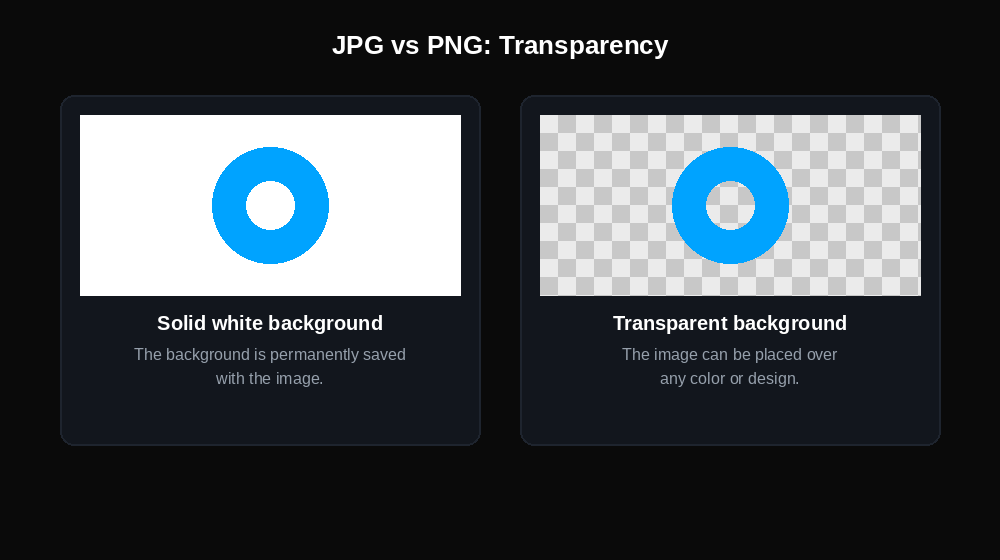
This single feature difference — PNG supports transparency, JPG does not — is responsible for more format mistakes than anything else.
When you save a transparent image as JPG, the transparent areas become solid white. This is why logos exported incorrectly appear with a white background instead of showing whatever is behind them. If you've ever seen a logo with an ugly white box around it on a colored website header, this is why.
For any image that needs to sit cleanly over different backgrounds — logos, icons, watermarks, overlays — PNG is the only choice between these two formats.
File Size: Real World Numbers
To make this concrete:
| Image Type | JPG Size | PNG Size |
|---|---|---|
| 1920×1080 photograph | 200–500 KB | 3–8 MB |
| Simple logo (500×500) | Not recommended | 20–80 KB |
| Screenshot (1440px wide) | 100–200 KB (with artifacts) | 300–800 KB |
| Product photo (800×800) | 50–150 KB | 800 KB–2 MB |
The pattern is clear: for photographs, JPG is dramatically smaller. For graphics, PNG is often smaller than a JPG at acceptable quality — and looks significantly better.
Quality Loss: What Actually Happens
JPG uses lossy compression which means some image data is permanently discarded when you save. The quality setting (usually 1–100) controls how aggressively data is discarded:
- Quality 90–100: Minimal loss, large file
- Quality 70–85: Excellent quality, significant size reduction — the sweet spot for web use
- Quality 50–70: Visible artifacts beginning to appear
- Below 50: Obvious degradation, blocky artifacts visible
PNG uses lossless compression — no data is ever discarded. Open a PNG, save it a hundred times, and it looks identical to the original every time.
The re-save problem with JPG: Each time you open and re-save a JPG, it applies lossy compression again. Edit a JPG five times and save it five times, and the quality loss is cumulative. This is why designers work in PNG (or PSD/TIFF) and only export to JPG as a final step.
JPG vs PNG for Websites: The SEO Angle
Both formats are fully supported by Google and don't inherently help or hurt SEO. What matters is file size and load time — a 5MB PNG on your homepage will hurt your Core Web Vitals score and therefore your rankings, regardless of the format name.
The practical SEO guidance:
- Use JPG for all photographic content on your site — smaller files load faster
- Use PNG for logos, icons, and graphics where quality and transparency matter
- Consider WebP for either use case — it offers smaller files than both JPG and PNG with similar quality
Can You Convert Between JPG and PNG?
Yes, and it's one of the most common image conversions. But there are important things to know:
JPG to PNG: The conversion preserves the current quality but doesn't improve it. If the JPG has compression artifacts, those artifacts are now stored losslessly in the PNG. You get a larger file with the same quality — not better quality. The benefit of converting JPG to PNG is stopping further quality loss if you need to edit and re-save the file multiple times.
PNG to JPG: You lose transparency (transparent areas become white or another background color) and apply lossy compression for the first time. This is appropriate when you have a PNG photo and need a smaller file for web use, but never do this with a PNG that has a transparent background — you'll lose the transparency permanently.
The Decision Made Simple
Ask yourself one question: does this image need a transparent background?
- Yes → PNG
- No → ask a second question: is this a photograph or a graphic?
- Photograph → JPG
- Graphic, logo, screenshot, or text → PNG
That two-question decision tree covers the vast majority of format choices correctly.
Frequently Asked Questions
Is PNG always better quality than JPG?
Not exactly. PNG preserves quality perfectly through lossless compression, but a JPG saved at high quality settings (85+) is virtually indistinguishable from PNG for most photographic content. PNG is better for graphics; JPG at high quality is fine for photos.
Why is my PNG so much larger than my JPG?
PNG retains all image data. For photographs with millions of color variations this produces large files because there's little pattern repetition for the compression algorithm to exploit. JPG discards subtle visual data to achieve small sizes. For photos, JPG is almost always more efficient.
Can I convert JPG to PNG to fix compression artifacts?
No. Converting a compressed JPG to PNG saves it losslessly going forward but the artifacts from the original compression are already baked into the image data. You can't recover lost quality through format conversion.
Does PNG support animation?
There's a format called APNG (Animated PNG) but it's not universally supported. For animation, GIF or WebP are more practical choices.
Which format do professional photographers use?
Neither, typically. Professional photographers shoot in RAW format which captures all sensor data without any compression. They process RAW files and export to JPG for delivery or PNG for graphic use. TIFF is another archival format used in professional photography workflows.
Is JPG or PNG better for printing?
Both are suitable for printing. For professional print work, the resolution (DPI) matters more than the format. PNG's lossless quality makes it slightly preferable for print, but a high quality JPG (quality 90+) is indistinguishable in most print applications.
Convert Between JPG and PNG
Need to switch formats? DigiToolzHub converts between JPG and PNG instantly in your browser — no software needed, no account required.