
What Is SVG? The Complete Guide to Scalable Vector Graphics
SVG is the odd one out among image formats. While JPG, PNG, and WebP all store images as grids of colored pixels, SVG stores images as mathematical instructions: "draw a circle here, a curved line there, fill this shape with this color." The result is an image that can be the size of a postage stamp or a billboard and look identical at both — because it's never actually rendered at a fixed size until the moment it's displayed.
This makes SVG indispensable for certain use cases and completely wrong for others. Understanding the difference is what this guide is for.
What Is an SVG File?
SVG stands for Scalable Vector Graphics. It's an open standard developed by the W3C (the same body that maintains HTML and CSS), first released in 2001 and now a core part of how the web works.
An SVG file is actually an XML text file — open one in a text editor and you'll see something like:
<svg xmlns="http://www.w3.org/2000/svg" viewBox="0 0 100 100">
  <circle cx="50" cy="50" r="40" fill="#0066cc"/>
</svg>
That's a blue circle. No pixels, just instructions. This is the fundamental difference between SVG and every raster format.
Vector vs. Raster: Why It Actually Matters
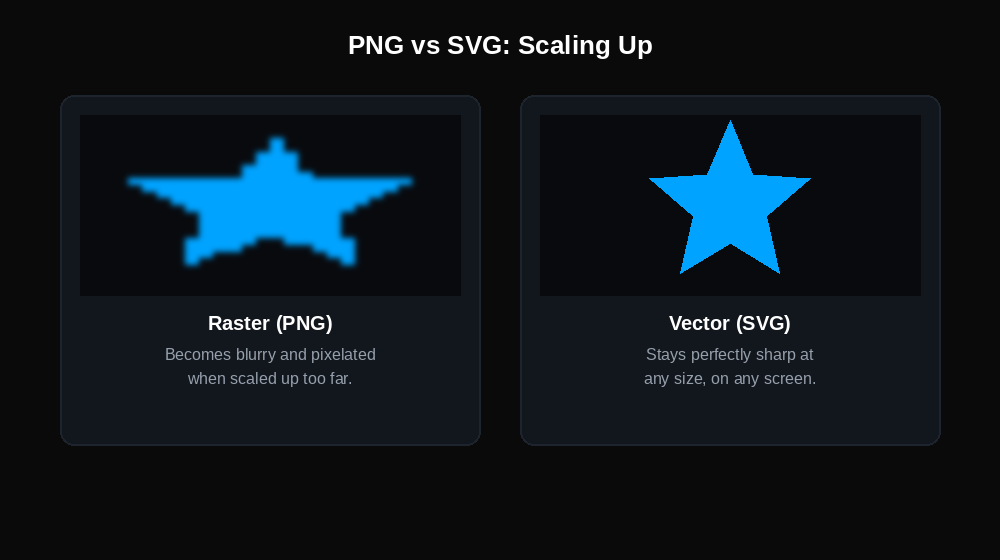
Raster images (JPG, PNG, WebP) store images as a fixed grid of pixels. A 500×500px PNG contains exactly 250,000 pixels. Display it at 1000×500px and the software has to invent pixels — which produces the blurriness you've seen when scaling up a small image.
Vector images (SVG) store shapes mathematically. Scale an SVG to any size and the math simply recalculates for that output size. No interpolation, no blurriness, no quality loss.
The practical consequence: A logo designed as an SVG looks sharp on a 16×16px favicon, a 300×300px website header, and a 10-foot-wide conference banner — all from the same single file. The same logo as a PNG requires you to export multiple versions at different resolutions, and even then it may look soft on Retina/high-DPI displays.
What SVG Is Made Of
Because SVG is a text format describing shapes, it works with a defined set of primitives:
- Basic shapes: rectangles, circles, ellipses, lines, polygons
- Paths: freeform curves and lines (the basis of most complex illustrations)
- Text: actual text strings with font references (not text converted to outlines)
- Gradients and patterns: fills defined mathematically
- Groups and transformations: rotation, scale, translation applied to elements
- Filters and effects: drop shadows, blurs, color manipulation
Complex SVG illustrations — detailed icons, infographics, maps — are composed of hundreds or thousands of these elements layered together.
SVG's Unique Capabilities (That No Raster Format Has)
Animatable with CSS and JavaScript Because SVG elements are part of the DOM (document object model), you can target them with CSS and JavaScript just like HTML elements. This means you can animate a logo's colors on hover, make an icon spin, or build interactive data visualizations — without video files or GIFs.
.logo-icon:hover { fill: #ff4400; transition: fill 0.3s; }Searchable and accessible text Text inside an SVG is real text, not a picture of text. Search engines can read it, screen readers can announce it, and browsers can translate it. A JPG of an infographic is invisible to search engines; the same content as SVG is fully indexable.
Styleable with CSS SVG properties like fill color, stroke width, and opacity can be controlled with CSS classes. This means a single SVG icon file can be recolored for different themes, dark mode, or states without creating separate image files.
Tiny file sizes for simple graphics A simple logo as SVG might be 2–5KB. The same logo as a PNG at 2× resolution (for Retina displays) might be 30–80KB. For icons and logos used across an entire website, this adds up to significant bandwidth savings.
When SVG Falls Apart
Photographs and photorealistic images: SVG cannot efficiently represent the millions of subtle color variations in a photograph. A photographic SVG file would either be enormous or look like a crude posterized illustration. Photos belong in JPG or WebP.
Complex illustrations: The efficiency of SVG breaks down with high-complexity artwork. A detailed illustration with thousands of paths, gradients, and effects can produce SVG files that are larger than equivalent PNG files and slower for browsers to render. There's a practical complexity threshold — roughly "simpler than a detailed cartoon character" — where SVG remains efficient.
Screenshots: Screenshots are inherently pixel-based. An SVG screenshot doesn't make sense conceptually and isn't how SVG works. Use PNG.
Software compatibility outside the web: SVG is a web-native format. While Illustrator, Figma, and Sketch handle SVG well, many other tools — older Office applications, basic image viewers, many print workflows — don't support it reliably. For file sharing outside a design/web context, export to PDF or PNG.
SVG vs. PNG: Choosing the Right Format
| Situation | SVG | PNG |
|---|---|---|
| Logo on a website | ✓ Preferred | Acceptable |
| Logo for print/email | Depends on software | ✓ Safer |
| App or UI icon | ✓ Preferred | Acceptable |
| Screenshot | ✗ | ✓ |
| Photograph | ✗ | ✗ (use JPG) |
| Infographic with text | ✓ | Acceptable |
| Animated graphic | ✓ (CSS/JS) | ✗ |
| Retina/high-DPI display | ✓ Automatic | Requires 2× export |
Need a PNG version of your SVG file? DigiToolzHub converts SVG to PNG instantly — no software needed, no account required.
How SVG Files Are Created
SVG files come from two main sources:
Design software: Illustrator, Figma, Sketch, Inkscape (free), and Affinity Designer all export SVG. Any vector design tool produces SVG output. The quality of the SVG depends heavily on how the file is structured in the design tool — unnecessarily complex paths, unconverted effects, and embedded raster images all bloat SVG files.
Hand-coded: SVG's text nature means developers sometimes write or modify SVG code directly. Icon libraries, data visualizations (D3.js), and UI components often involve hand-crafted SVG.
Converted from raster: You can convert a PNG or JPG to SVG through a process called auto-tracing, where the software attempts to identify shapes and redraw them as vector paths. Results vary enormously — simple logos with flat colors trace well; photographs and complex graphics produce messy, oversized SVG files. This conversion is a workaround, not a transformation into true vector artwork.
SVG Optimization: Why File Size Varies Wildly
SVG files exported directly from design software often contain unnecessary data: editor metadata, redundant coordinates, verbose attribute formatting. An unoptimized SVG might be 15KB; the same graphic optimized with a tool like SVGO can drop to 4KB.
If you're putting SVGs on a website, optimization matters. Most build tools and CDNs handle this automatically, but it's worth knowing why SVG file sizes sometimes seem larger than expected.
Need to convert your SVG to a more compatible format? DigiToolzHub handles it instantly in your browser — no software needed, no account required.
How to Convert SVG Files
Common conversion needs:
- SVG → PNG — for software compatibility, email, or when you need a fixed-resolution raster image
- SVG → JPG — for contexts that don't accept SVG (note: any transparent background becomes white)
- SVG → PDF — for print workflows or document embedding
- SVG → WebP — for web contexts that prefer a raster format
Convert SVG files directly in your browser at DigiToolzHub — no software needed.
Frequently Asked Questions
Can I use SVG on any website? Yes. SVG has been supported in all major browsers for over a decade. It can be used as an <img> tag source, an inline element in HTML, or a CSS background image.
Why does my SVG look blurry in some contexts? SVGs look sharp everywhere when rendered natively as SVG. If you've converted an SVG to PNG at a small size and then enlarged it, you're back to raster scaling issues. The solution is either to use the SVG directly or export the PNG at the size you actually need.
Can SVG files contain malware? Technically yes — because SVG is XML that can contain JavaScript, a maliciously crafted SVG could execute scripts when opened in a browser. For this reason, user-uploaded SVGs should be sanitized before display. This isn't a concern for SVGs you create or download from trusted sources. If you've received an SVG file and need it in a safer more compatible format, DigiToolzHub converts SVG files instantly in your browser — no software needed, no account required.
Is SVG good for email? Generally no. Most email clients — Outlook in particular — have poor or no SVG support. Use PNG for email graphics.
What's the difference between SVG and AI/EPS files? Adobe Illustrator (.ai) and EPS are also vector formats, but they're proprietary and designed for print/design workflows. SVG is the open web standard. Most design software can export to both; use SVG for web, AI/EPS/PDF for print.
The Bottom Line
SVG is the format to reach for when you need a graphic that stays sharp at any size, can be styled or animated, and keeps file sizes small. Logos, icons, UI elements, and simple illustrations are its natural home. The key is knowing when not to use it — photographs, complex artwork, screenshots, and email graphics are all better handled by raster formats.